@wreed
Sorry, for not being able to communicate well.
In my very first posting, I was pointing out that the folder structure is different in my appium. 1.22 version installation (both appium GUI, and appium through npm).
My WebDriverAgent.xcodeproj is existing with in
and
/usr/local/lib/node_modules/appium/node_modules/appium-webdriveragent/
folders respectively for Appium GUI and Appium via node.js installations.
The suggested folder
/usr/local/lib/node_modules/appium/node_modules/appium-xcuitest-driver/WebDriverAgent/ exists upto
/usr/local/lib/node_modules/appium/node_modules/appium-xcuitest-driver/ folder only
The possibility of invoking commands
- mkdir -p Resources/WebDriverAgent.bundle
- ./Scripts/bootstrap.sh -d
does exist only for Appium GUI server installation location only, as /Scripts/bootstrap.sh file does not exist for node.js installation at /usr/local/lib/node_modules/appium/node_modules/appium-webdriveragent/Scripts folder
Again, I ran the brew commands as per @edrum’s suggestion
- brew uninstall carthage
- brew install carthage
- brew link --overwrite carthage
- restart & try
I pointed my XCode project at the Appium Gui installation location at /Applications/Appium.app/Contents/Resources/app/node_modules/appium/node_modules/appium-webdriveragent/, but I still got the same result.
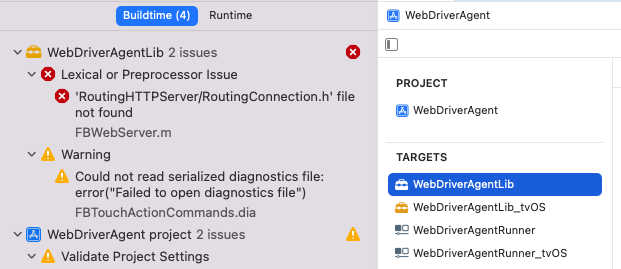
My sincere apologies, for not being able to follow the help correctly. This is my first time, setting up Appium for testing iOS devices on Mac OS(Monterey v. 12.2.1). And I did not expected this much deviation from the documented help.