Migration from 2.17 to 3.2 broke click() actions totally

Ours is a one man team for test automating a Hybris eCommerce mobileweb site on two real devices like Android-Chrome, and iOS-Safari platforms. Our Apple desktop is set up with nodejs v25.5, XCODE v.26.4, JDK v.21.0.8, Maven v.3.9.8 etc.,connected with real devices using USB cable. While successfully developed some 25 test programs, which were working
finely with the above technical set up and when Appium is at v.2.17.
Caveat:

  • eCommerce platform SAP-Hybris builds HTML pages automatically with logic and included stylesheets
  • Web site is designed as Responsive type, which supports desktop, notepad, phone with the same HTML

but ever since we upgraded to Appium v3.2, some back ward code breaking changes happened like failing click actions on
web elements on one or both platforms. Some of the click actions are rectified using JavaScriptExecutor method.

Typical behavior at the click actions, even though the selector is correctly matching in DevTools

  • WebElement.click() call just passes with no result
  • ExpectedConditions.visibilityOfElement issue due to overlays
  • ExpectedConditions.elementToBeClickable issue due to opacity,timing issues
  • JavaScriptExecutor.executeScript(“arguments[0].click();”, webElement) works some times
    The WebElement click() actions are very flaky overall.

We believe both Android-Chrome, and iOS-Safari platforms are diverging in Enforcing strict W3C specification.

What are the means to rectify the click() actions in code:

  • one test class after another to execute ‘regression’ testing, which of course are tedious and time-consuming?
  • Downgrade Appium from v.3.2 to 2.17 and continue the regression tests

As we are one man team and our project facing an existential threat to move forward, please help.

As we are just one man team, I am happily accept any other mistake I might be doing.
Appium 3.2:

1 what about Java client versions?

2 what selenium-java version?

3 tried →

Actions actions = new Actions(driver);
actions.moveToElement(element).click().perform();

4 finally can use →

PointerInput finger = new PointerInput(PointerInput.Kind.TOUCH, "finger");
Actions touchActions = new Actions(driver);
touchActions.tick(finger.createPointerMove(Duration.ofMillis(0), PointerInput.Origin.fromElement(element), 0, 0))
            .tick(finger.createPointerDown(PointerInput.MouseButton.LEFT.asArg()))
            .tick(finger.createPointerUp(PointerInput.MouseButton.LEFT.asArg()))
            .perform();

good luck

Dear @Aleksei ,

1 what about Java client versions?

		<dependency>

			<groupId>io.appium</groupId>

			<artifactId>java-client</artifactId>

			<version>10.1.0</version>

		</dependency>

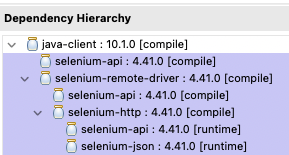
2 what selenium-java version?

I did not include Selenium-java separately. I am using the one bundled with Appium itself, which is Selenium 4.41.0

3 tried →
4 finally can use →

Actions actions = new Actions(driver);
actions.moveToElement(element).click().perform();

I did not try this Actions based methods yet. Are we sure these when implemented would work ?
I would try if it is advised.

I am working mostly with native app and tried all I suggested (double checked that they also work with webView).

I believe you can try also downgrade versions of uiautomator2 and xcuitest to see if it has any effect. If problem appearing at both iOS/Android platforms and solving with driver downgrade → this is something with Appium changes. While when problem appears e.g. only with iOS while not with Android this is looks for me isolated driver problem and cound be e.g. iOS driver problem that need to be fixed or workarounded…

BTW yesterday i compared which tap faster

iOS 
    actions.moveToElement((WebElement) el).click().perform(); totalTaps: 44 / Average tap time: 1930
    page.getDriver().perform(Arrays.asList(tapSeq));          totalTaps: 46 / Average tap time: 1589
    js.executeScript("mobile: tap", params);                  totalTaps: 46 / Average tap time: 2439

W3C solution with Sequence and Perform is fastest. While native mobile:tap slowest :slight_smile:

@Aleksei

As I mentioned, what I was doing is a regression testing of my own test programs. They were developed to work on both platforms like Android-Chrome, and iOS-Safari, on a mac system with JDK 21.

When I started testing one program at a time on each platform each platform has on average 5 failures out of 15-20 total click actions. These click() failures are all over the place, like some time common to both platforms, some times not. Mostly they go like,

–click() executes with no resulting action,
–visibility issue,
–not clickable issue etc.,

Blame on our side is our web site pages are not hand coded, but assembled by SAP Hybris framework making use of a style sheet library. You can understand the problem.

With the help of chatGPT, I had come up with a smartClick() which does

* PRODUCTION-READY Smart Click - Appium 3.x W3C Compliant

*

* Enhancements:

* ✓ W3C clickability validation (visible+enabled+viewport+not-obscured+not-animating)

* ✓ Post-click effect verification

* ✓ Three-tier fallback: native/touch → JS → W3C Actions

* ✓ Animation/transition detection

* ✓ Active interception remediation

* ✓ Extended iOS Safari rendering delays

* ✓ Graceful degradation with soft-success

Going to test the method in place of webElement.click(). Fingers crossed :crossed_fingers:

1 Do all click in your code go to ONE function so you can easily change/test?

2 If it does or you updated to have it. Try retry logic e.g. I did add one retry tap when it fails by any reason after…. → lets better see the code. It is specific to native but you should see the idea of retry one more time … Yes this is all workarounds but! it works as bullet proof with native view.

protected <T> boolean tap(final T el, final int times, final boolean visibilityCheck) {
        boolean result = false;
        if (el == null) {
            Logger.logError("Element is NULL !!!!!");
            return false;
        }

        for (int i = 0; i < times; i++) {
            for (int j = 0; j < 2; j++) { // 2 tries to make tap
                if (visibilityCheck && page.getIsIOS()) {
                    // Logger.log("check visibility");
                    try {
                        if (!((WebElement) el).isDisplayed()) {
                            Logger.logError("isDisplayed = false");
                            sleep(500);
                            continue;
                        }
                    } catch (Exception e) {
                        Logger.logError("try " + j + " : FAILED");
                        sleep(500);
                        continue;
                    }
                }
                try {
                    Rectangle rect = ((WebElement) el).getRect();
                    int centerX = rect.getX() + (rect.getWidth() / 2);
                    int centerY = rect.getY() + (rect.getHeight() / 2);
                    PointerInput finger = new PointerInput(PointerInput.Kind.TOUCH, "finger");
                    Sequence tapSeq = new Sequence(finger, 1);
                    tapSeq.addAction(finger.createPointerMove(Duration.ofMillis(0),
                            PointerInput.Origin.viewport(), centerX, centerY));
                    tapSeq.addAction(finger.createPointerDown(PointerInput.MouseButton.LEFT.asArg()));
                    tapSeq.addAction(finger.createPointerMove(Duration.ofMillis(50),
                            PointerInput.Origin.viewport(), centerX, centerY));
                    tapSeq.addAction(finger.createPointerUp(PointerInput.MouseButton.LEFT.asArg()));
                    page.getDriver().perform(List.of(tapSeq));
                    result = true;
                    break;
                } catch (StaleElementReferenceException e) {
                    Logger.log("try " + j + " : FAILED with StaleElementReferenceException", true);
                    sleep(500);
                } catch (Exception e) {
                    if (e.getMessage().contains("Could not proxy command to remote server")
                            || e.getMessage().contains("is not visible on the screen")) { // try it again
                        sleep(200);
                        Logger.log("try " + j + " : FAILED", true);
                    } else {
                        if (e.getMessage().contains("Can't locate an element"))
                            Logger.log("try " + j + ": Element NOT found", true);
                        else
                            Logger.log("try " + j + ":\n" + e.getMessage(), true);
                        break;
                    }
                }
            }
            if (!result)
                break;
            sleep(100);
        }
        sleep(DEFAULT_AFTER_TAP_TIME);
        return result;
    }